—For restaurants, cafés & bars

Your whole restaurant, on the WiFi you already have.

Tables, takeaway and Swiggy or Zomato orders, kitchen and bar tickets, GST bills, stock, accounts and day close, all running on your own computer or Android tablet. Every phone in the restaurant joins by scanning a QR code. Your orders and sales never leave your restaurant. No commission, ever.

Set up in an afternoon · Keeps working when the internet drops · Your data, only on your devices

01What it does

From the door to the day close.

One system for the floor, the kitchen, the bar and the office, built for how Indian restaurants actually run service.

01

Tables & rounds

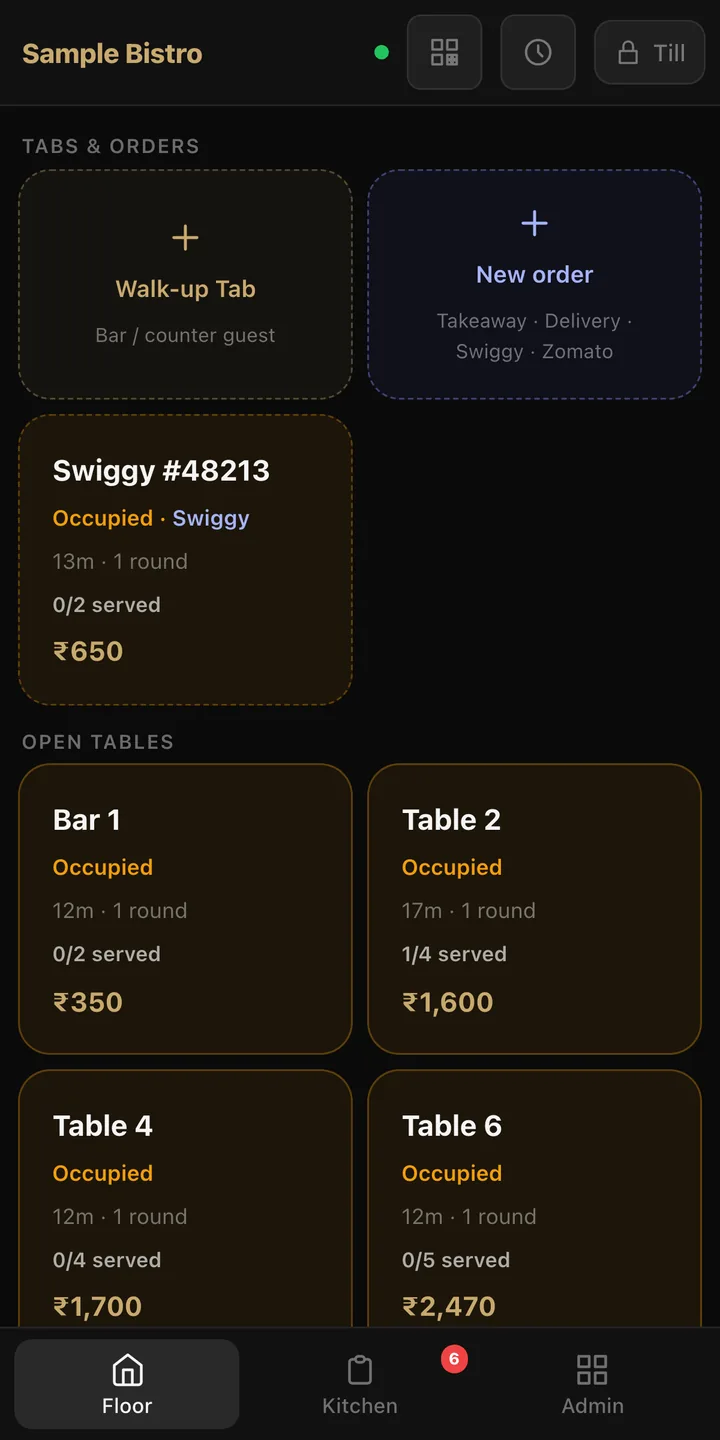
Open a table, add items, send each round to the kitchen, order more later. Walk-up tabs for the bar and counter. Every waiter's phone or tablet sees the same floor, live.

02

Kitchen & bar tickets

Food prints in the kitchen, drinks print at the bar, automatically, on as many network printers as you need. No printer? Orders show on a kitchen screen instead. If a printer goes offline, nothing is lost.

03

A ping for every dish

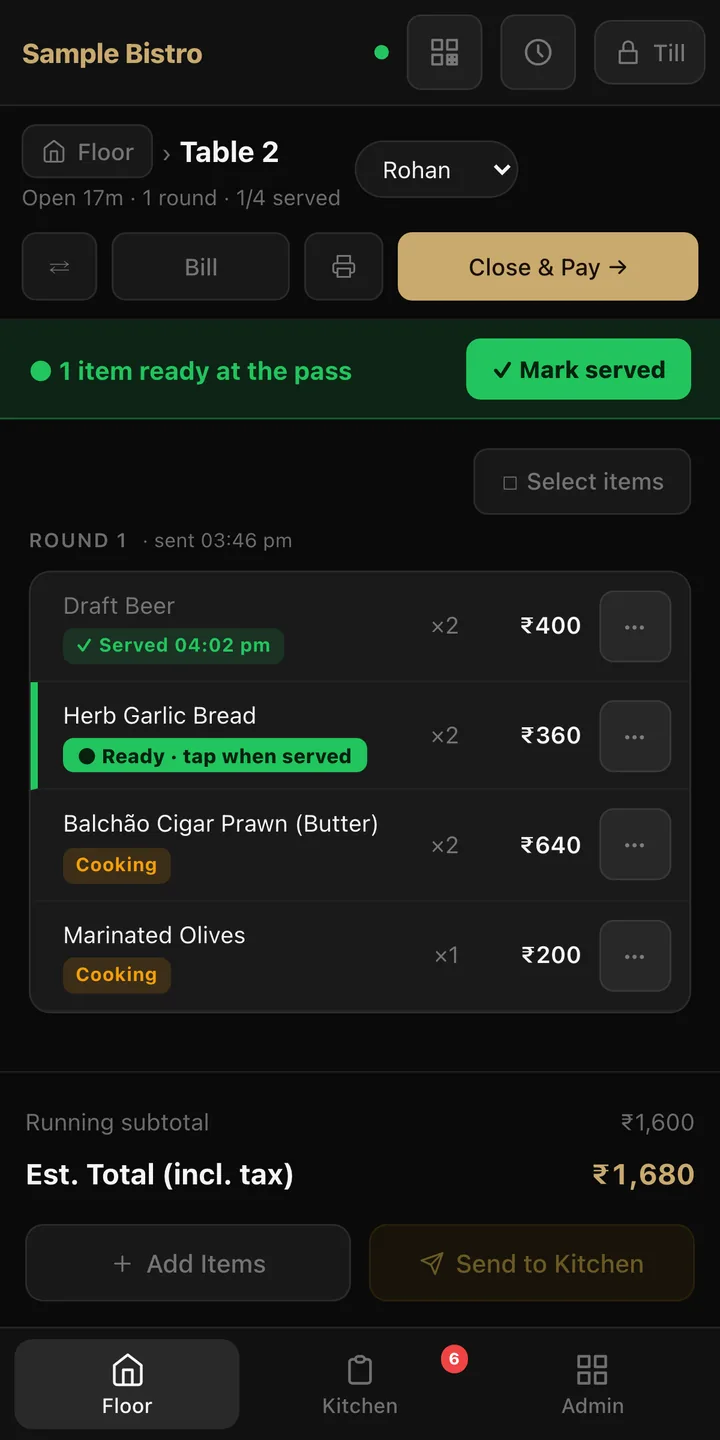
The moment the kitchen marks any item ready, the floor hears it: "Table 4 · Paneer Tikka ready." Food leaves the pass hot, not when the whole order is done.

04

Bills, done right

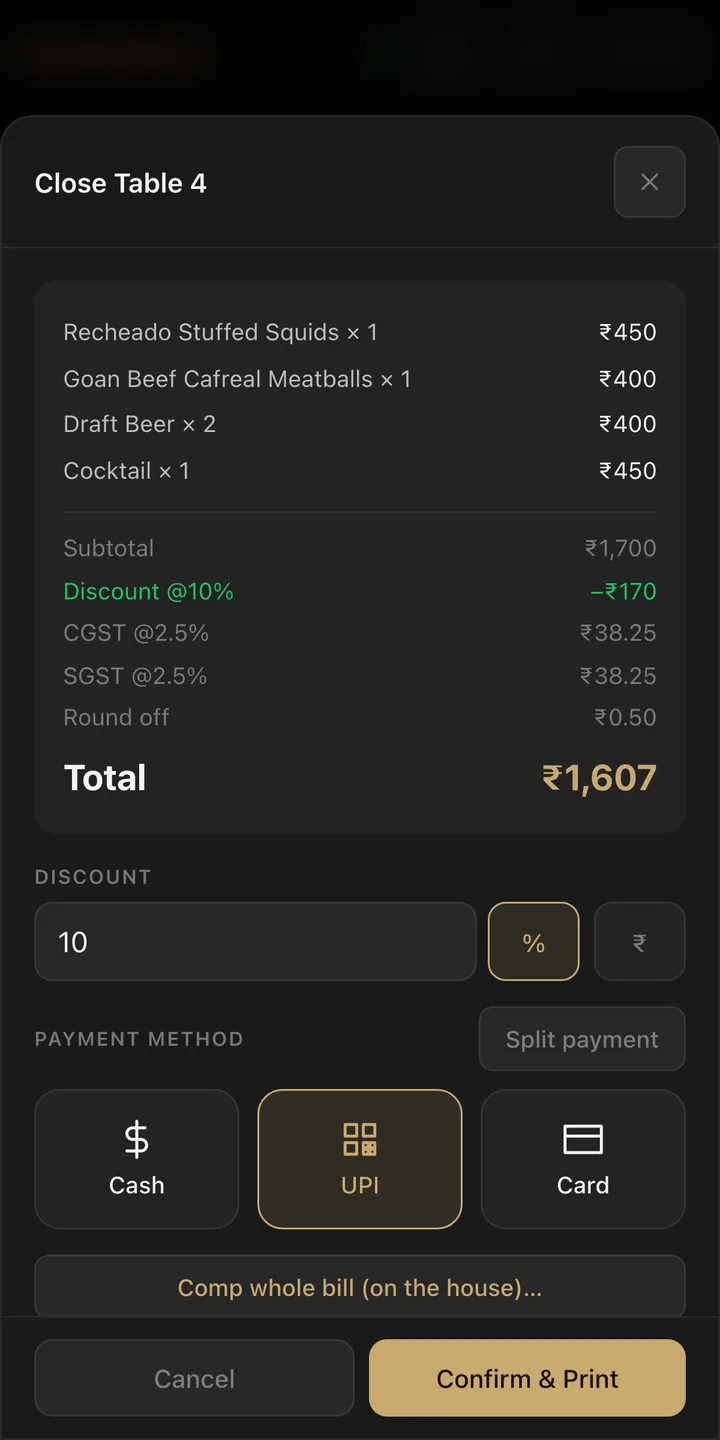
CGST and SGST worked out for you, discounts, service charge, split payments across cash, UPI and card. Bills print on your receipt printer.

05

Staff check-in by fingerprint

Staff clock in and out with the fingerprint on their own phone, only when they're on the restaurant WiFi. Hours are tracked for you. A PIN works too.

06

Open & close the day

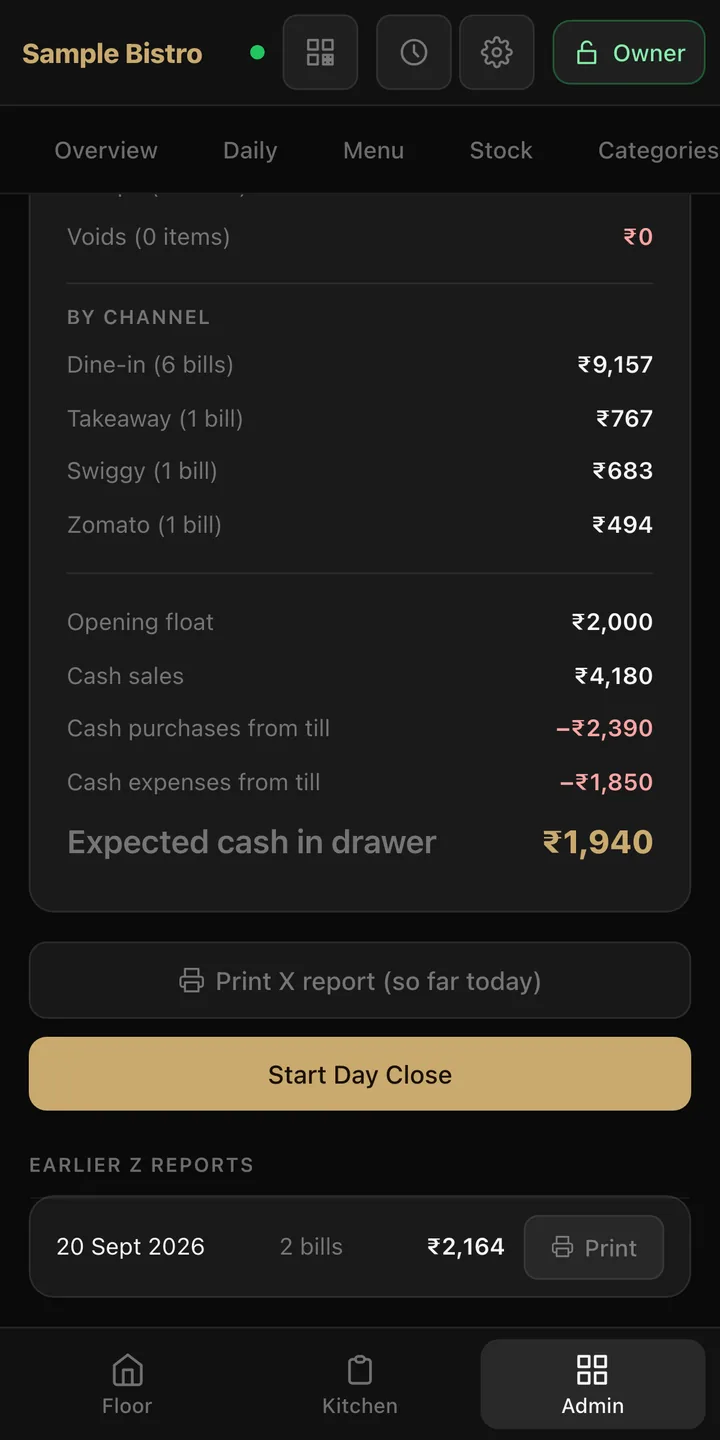
Open the day by counting the float. Close it with a proper Z-report: the cash counted against what should be in the drawer, after anything paid out of the till. Files for your accountant and a full backup every day, automatically.

07

Swiggy, Zomato & takeaway

Takeaway, delivery and Swiggy or Zomato orders go through the same kitchen tickets, bills and reports as your tables, with the partner's order number on every ticket and each platform's commission tracked.

08

Stock & accounts

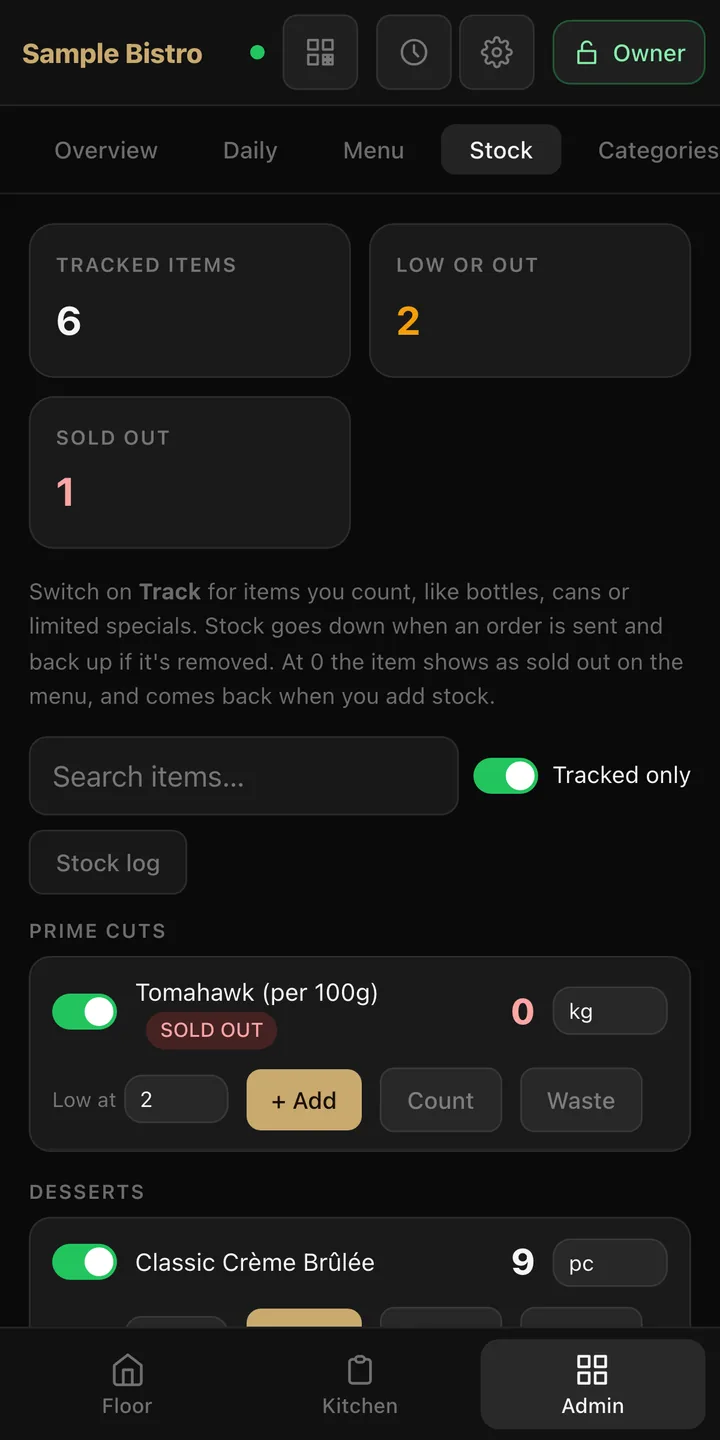
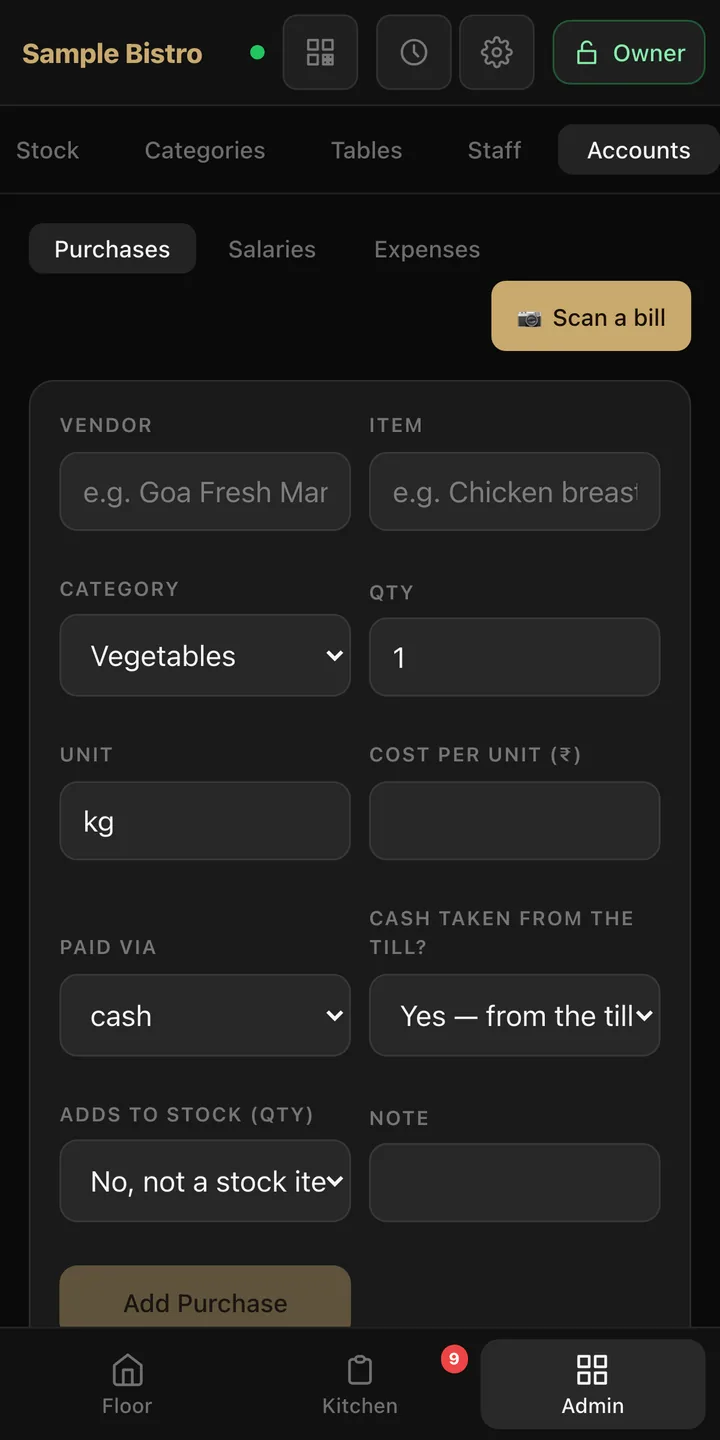
Track bottles, cans and specials: stock goes down as orders go out, and a dish shows as sold out at zero. Log purchases, salaries and expenses, or scan a supplier bill with the camera.

02Your data

Your sales are your business. Not ours.

Most restaurant apps keep your orders, sales and menu on their own servers. TafelOS keeps all of it on the computer or tablet in your restaurant. We never receive a copy, so there's nothing for us, or anyone else, to look at.

Stored in your restaurant

Menu, orders, bills, staff, purchases and expenses live only on your main device, with a full backup every day on that same device.

Seen only by your team

You decide who sees what. Waiters, cashiers and managers each get their own PIN and only the screens their role needs. Not us, not Google, not a cloud company.

Never held hostage

Export everything whenever you like. Even if a subscription lapses, you can still open TafelOS, close open bills and take your data with you.

What TafelOS sends us: only your install code, restaurant name and GSTIN, once, so we can issue your licence. No orders, no sales, no staff details, no analytics or tracking. Read the privacy policy

03The Android app

One tablet runs it. Every phone joins.

No computer at the counter? TafelOS runs on an Android tablet. It keeps the orders and the books, and waiters order from their own phones.

  • The main tablet keeps everything

    Orders, bills, day close and daily backups live on one Android tablet at the counter. It prints to WiFi or Bluetooth receipt printers and keeps running with the screen off.

  • Waiters use their own phones

    The TafelOS app on Android, or just the browser on any phone, iPhones too. Scan the QR code on the main tablet and start taking orders.

  • No internet needed

    Everything runs on your restaurant's WiFi. Two waiters on the same table see the same order, live, even if the internet drops mid-service.

Ask about the Android app Running at our first restaurants in Goa. We install it for you along with the rest of TafelOS.
04Inside the app

Every screen, explained.

This is the real TafelOS app, version 0.1.5, running a sample restaurant. Follow one day from opening the till to closing it.
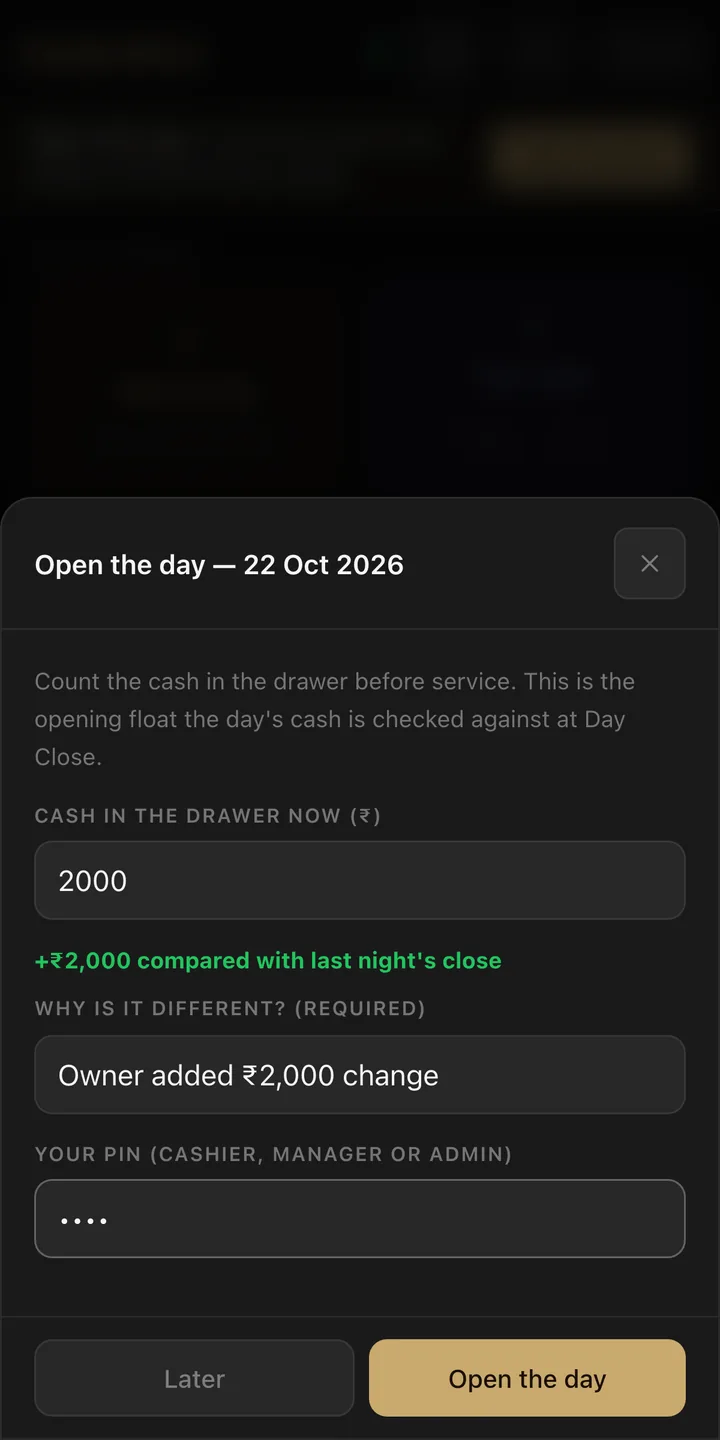
The Open the day screen: cash in the drawer, a reason for the difference, and a PIN
The floor screen with a Swiggy order and busy tables showing rounds, served counts and totals
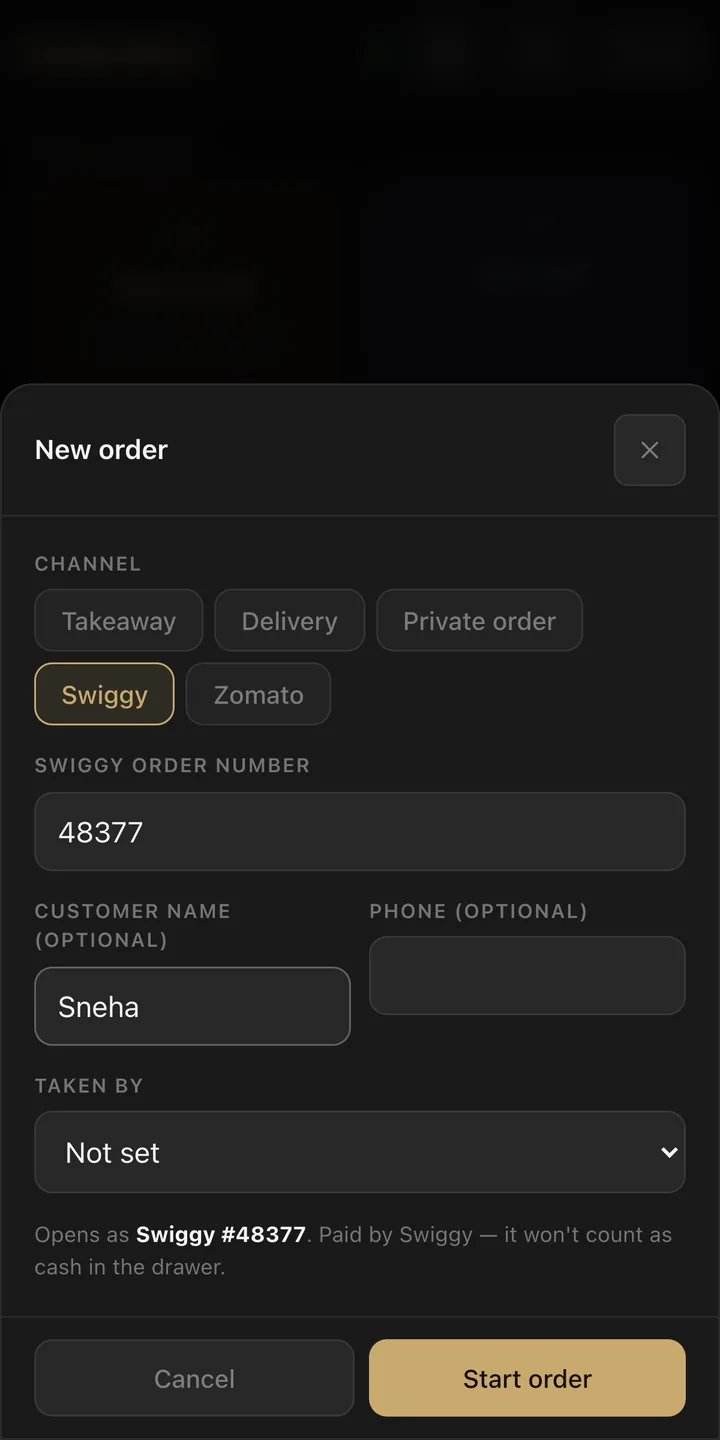
The New order screen with Swiggy selected and the partner order number filled in
A table screen showing a dish ready at the pass, with Served, Ready and Cooking tags on each line
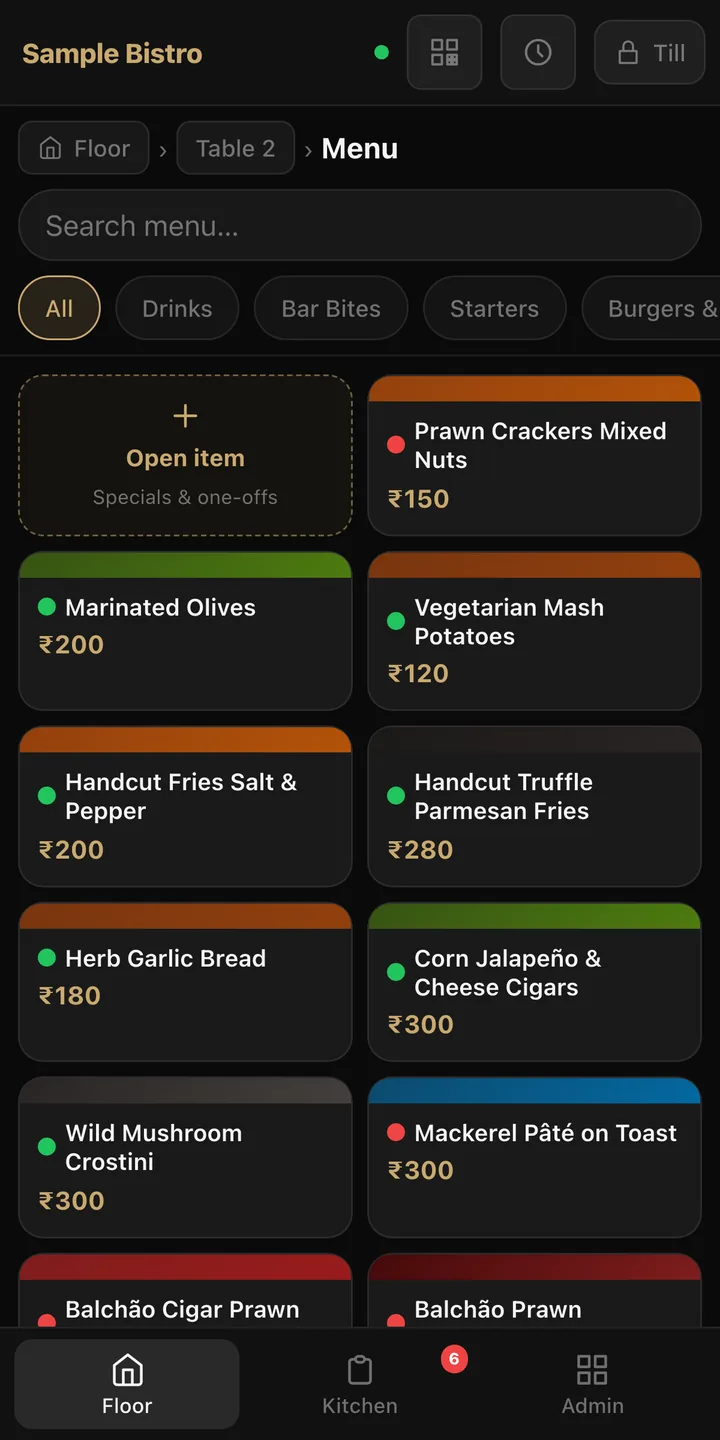
The menu screen: search bar, section chips and colour-coded dish cards with prices
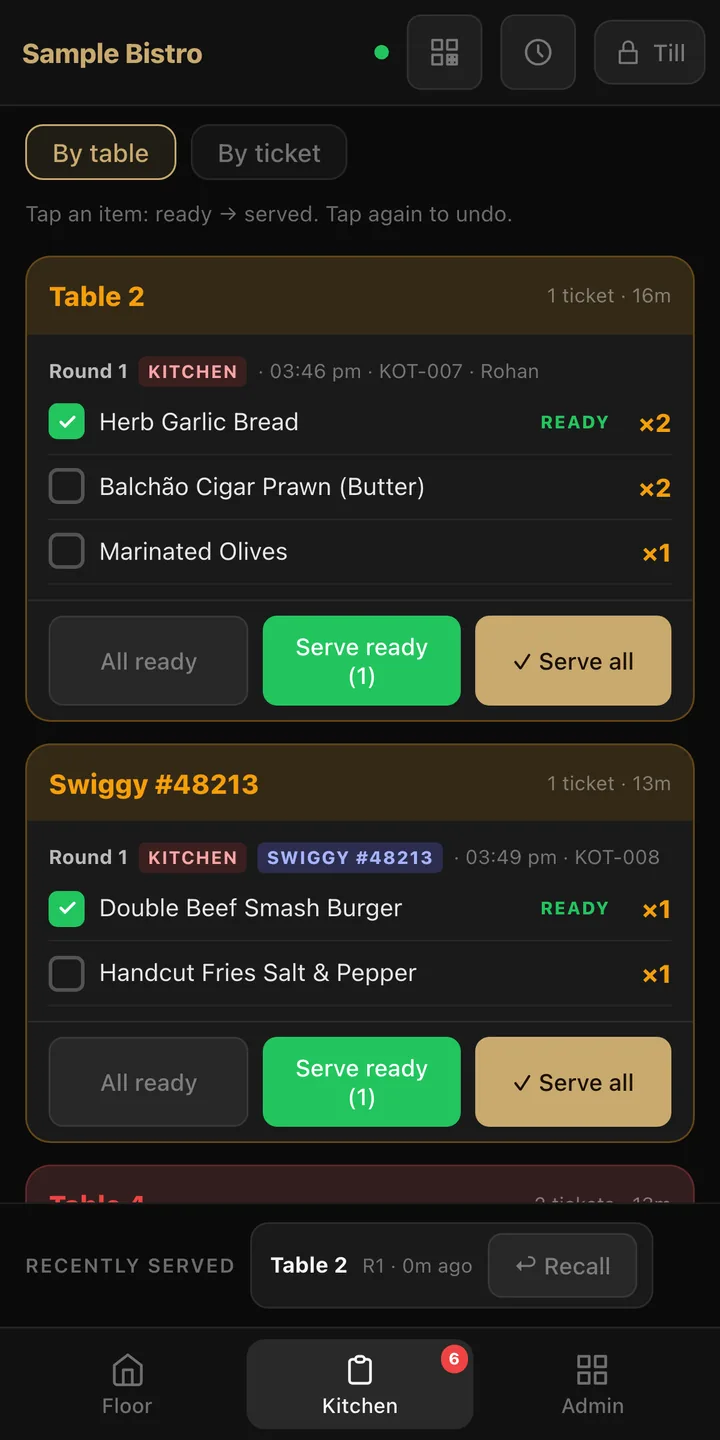
The kitchen screen with tickets by table, ready ticks, and a Swiggy order tag
The Close Table screen with a 10% discount, CGST and SGST lines, and Cash, UPI and Card buttons
The stock screen: tracked, low and sold-out counts, and items with Add, Count and Waste buttons
The accounts screen with Purchases, Salaries and Expenses tabs, a Scan a bill button and the purchase form
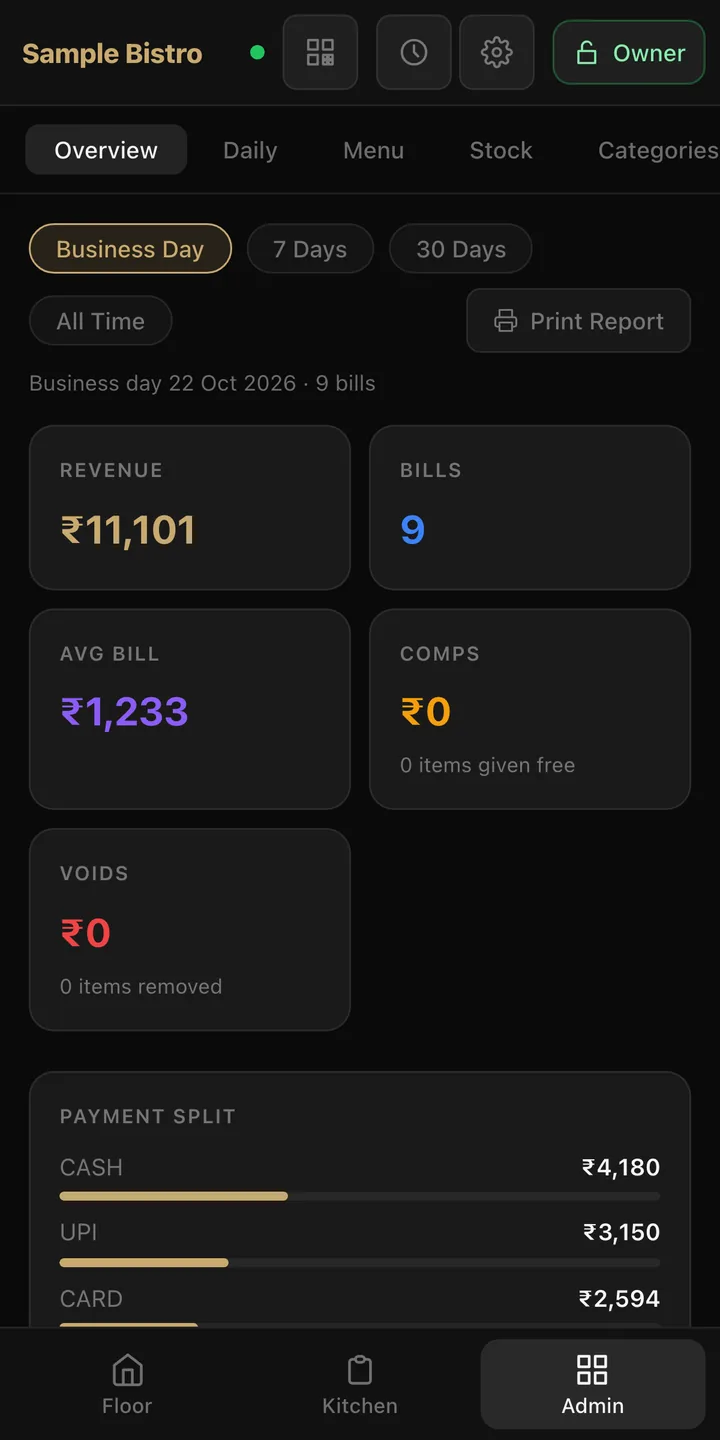
The reports screen showing revenue, bills, average bill, comps, voids and the payment split
The day close screen: sales by channel, the opening float, cash paid from the till and expected cash in the drawer
01 / 11

Open the day, count the float

Every day starts with the cash in the drawer, so the evening count has something to check against.

  1. 1Count the cash in the drawer before service.
  2. 2If it doesn’t match last night’s close, TafelOS asks why.
  3. 3Only a cashier, manager or owner can open the day, with their own PIN.
05Pricing

Pay yearly, or own it outright.

One price per restaurant. Every waiter phone, kitchen screen and printer is included, and there's never a commission on your orders.

Lowest cost to start

Subscribe

One payment a year. Renew when it's due.

₹7,999/ year

That's about ₹667 a month

  • Every feature, and every update as it comes out
  • Help on WhatsApp
  • No lock-in. Stop renewing and your data stays with you.
Book a free demo

Own it

Pay once. The licence never expires.

₹24,999one time

then optional updates and support at ₹2,999 a year

  • A permanent licence for your restaurant
  • First year of updates and support included
  • Skip the yearly plan and TafelOS keeps working
Ask about owning it
Switching from another app?Your first year runs 14 months, and we move your menu over for you.
More than one outlet?25% off the licence for every extra outlet.

Prices are per restaurant. Hardware is separate: use what you already have, or take one of the bundles below.

06Hardware bundles

Ready to serve, out of the box.

Rather not source devices yourself? We supply them set up, tested with TafelOS and loaded with your menu. The TafelOS licence is priced separately, above.

01

Starter

Cafés, counters and small bars.

  • Android tablet as the main till
  • Stand and charger for the counter
  • TafelOS set up with your menu
HardwareOn request
Enquire on WhatsApp
Good fit for most restaurants 02

Floor

Full-service restaurants with table service.

  • Android tablet as the main till
  • 2 phones for waiters, ready to order
  • Stand and chargers
  • Set up and connected on your WiFi
HardwareOn request
Enquire on WhatsApp
03

Full kitchen

Busy kitchens that want paper tickets.

  • Android tablet as the main till
  • Phones for waiters
  • Thermal receipt printer for kitchen tickets and bills
  • Installed and tested on site
HardwareOn request
Enquire on WhatsApp

Device models depend on what's in stock, so we quote hardware within one working day. Every device is tested with TafelOS before it reaches you. Already have phones, tablets or a printer? We'll use them.

07How you get it

Up and running in days, not weeks.

No long contracts. Tell us about your restaurant and we take it from there.

1

Send an enquiry

Two minutes, below. We call you back within one working day.

2

See it running

A free demo on your own tables and menu. Then choose to subscribe or buy it outright.

3

We set it up

In person, or with you over a video call. On the computer you already have (Windows or Mac) or an Android tablet, with your printers, then every phone by QR code.

4

Serve

Setup takes an afternoon, and your team takes orders that same day. Help is a WhatsApp message away.

08Questions

Before you ask.

If yours isn't here, put it in the enquiry form. A real person answers.

Do I need internet?

No. Orders, kitchen and bar tickets, bills and day close all run over your restaurant's own WiFi. The one exception is fingerprint check-in: the staff member's phone opens a sign-in page on tafelos.com, which stores nothing. PIN check-in works without internet.

What hardware do I need?

One computer (Windows or Mac) or Android tablet that stays on during service, your WiFi router, and whatever phones or tablets you want for waiters and the kitchen. Printing works with standard network receipt printers (network port or WiFi), and Bluetooth printers on the Android tablet. Or take one of our hardware bundles. We check your setup during the demo.

How many printers and screens can I connect?

As many as you need. Several kitchen printers, a bar printer, a bill printer, plus kitchen and bar screens. Each device joins by scanning a QR code.

Who can see my sales and data?

Only you and the staff you give a PIN to. Everything is stored on your own computer or tablet, never on our servers, so we can't see your sales and neither can anyone else. TafelOS saves a full backup every day on that device and writes your sales and expenses to files at every day close, ready for your accountant. Privacy policy.

How much does it cost?

Subscribe yearly, or buy it outright with a licence that never expires. Either way it's one price per restaurant, with every phone, screen and printer included and no commission on orders. See pricing. Hardware is extra, only if you need it.

What happens if I don't renew my subscription?

Nothing is deleted. After a short grace period TafelOS goes view-only: you can still see everything, close open bills and export all your data, so you're never locked out in the middle of service. Renew and it unlocks. If you bought it outright, this never applies.

I already use another billing app. Is switching hard?

No. Send us your menu as a photo or a file and we load it into TafelOS before your demo, so you see your own dishes and prices from the first minute.

Does it handle Swiggy and Zomato orders?

Yes. Start a New order, pick Swiggy or Zomato and type in the partner's order number. It prints on the kitchen ticket, the bill is marked as paid by the platform so it never counts as cash in your drawer, and the platform's commission shows in your reports. TafelOS doesn't link to the Swiggy or Zomato apps, so orders are typed in from their tablet.

Can I just download it?

Not yet. We set up every restaurant with you, in person or over a video call, so your printers, phones and staff work properly from day one. The Android app is set up the same way.

09Enquire

Let's get your floor running.

Tell us a little about your restaurant. We'll call you back to set up a free demo.

  • 01A call back within one working day
  • 02A free demo with your own menu
  • 03Subscribe or buy outright, with no commission on orders
+91

We only use your details to contact you about TafelOS.

✓

Thank you. We'll call you soon.

Expect a call or WhatsApp from us within one working day to set up your free demo.